Download SpyHunter Virus Remover

3/16/14

How to Uninstall / Remove Windows Defence Master Rogue Program

Windows Defence Master Descriptiom


Windows Defence Master is a rogue program which damages your computer seriously. It injects malicious files and registry entries to your computer once installed. It scans your computer automatically, and displays fake information to users saying that there are many threats and viruses in your computer. However, when users click Remove All, they are asked to purchase the Windows Defence Master program. Users are not recommended to download or purchase anything because it is a malware in essential, and will install other viruses or rogue program to your system if you purchase the so-called Windows Defence Master to your PC. Your financial information such as credit card number might be revealed to hackers or designers of this rogue program if you purchase this program here. Users are recommended to uninstall Windows Defence Master as soon as you can to protect your computer and your personal information.

3/15/14

How to Remove Trojan.LNKbaddst-AG[ trj] Virus

Trojan.LNKbaddst-AG[ trj] Description


Trojan.LNKbaddst-AG[ trj] is a dangerous Trojan virus which causes problems for users. It is installed when users download or update programs from the Internet because it is bundled with share programs or games on the Internet usually speaking. It can also be distributed via spam email attachments or hacked web sites.

How to Remove “Warning! You Have Excessive Pop-Ups” Fake Warning

“Warning! You Have Excessive Pop-Ups” Description


“Warning! You Have Excessive Pop-Ups” displays on your screen when users browse the Internet. It asks you to call a number to fix this problem. Actually, this is a browser add-on which causes browser problems. Usually speaking, it injects its own files to your system, and changes the default browser settings. That is why users may suffer homepage hijacker or redirection problems. Besides, malicious toolbars will be installed to your browsers to mess up your browser functions.

3/13/14

How to Stop Trovigo.com – www.Trovigo.com Removal Guide

Trovigo.com Description  


Trovigo.com attacks your computer without your notice and pretends to be a legal search engine. It replaces your homepages each time you open your browsers. The problem is did you ever install it to your browsers? If not, how did it come to your computer? Trovigo.com can be classified as a browser hijacker infection which attacks your computer without your permission. Usually speaking, it is bundled with share programs or games, and installed when users download or update programs from the Internet. It can also be distributed via spam email attachments or hacked web sites.

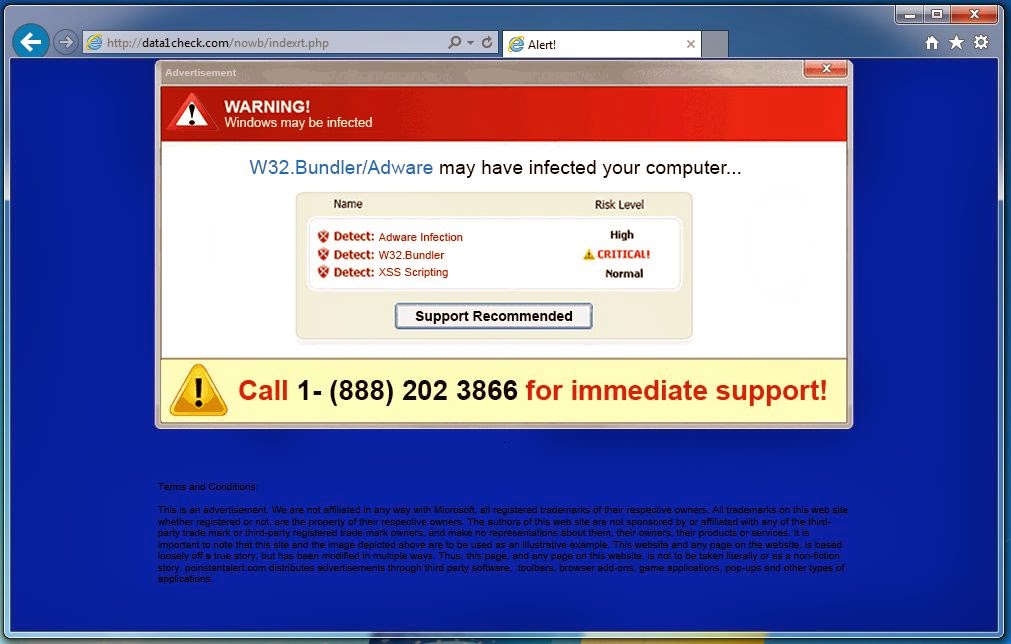
How to Stop Data1Check.com - Data1Check.com Browser Hijacker Removal Instruction

Data1Check.com Description


Data1Check.com is a browser hijacker virus which is able to block your browsers completely.

Warning!
W32.Bundler/Adware may have infected your computer
Support Recommended 


3/12/14

How to Uninstall Windows Security Master Rogue Program

Windows Security Master Description


Windows Security Master pretends to be a legal anti-virus program, however, it is a rogue program and damages your computer seriously once installed. This computer virus corrupts your system files and programs files so that your computer cannot work normally as usual.

How to Remove Exploit:Win32/CVE-2011-0096 Trojan Horse Virus?

Exploit:Win32/CVE-2011-0096 Description


Exploit:Win32/CVE-2011-0096 is classified as a Trojan horse virus which is able to damage your system. It attacks your computer without your notice. Usually speaking, it is bundled with share programs or games on the Internet, and is installed when users download or update programs from the Internet. It can also be packed with spam email attachments or hacked web sites.

3/10/14

How to Uninstall / Remove Windows Security Booster Rogue Program

Windows Security Booster Description


Windows Security Booster corrupts your computer seriously. It can be identified as rogue program which attacks your computer without your notice. It pops up whenever users boot up their computers, saying that there are many viruses and threats in your computer. If you click Remove to fix all those threats, you are asked to purchase this program. However, users are not recommended to download or purchase anything from here because it is a malware, and will install other viruses and threats to your computer. Your financial number might be revealed to hackers or designers of this rogue program if you purchase Windows Security Booster.

How to Stop Caramava - Caramava Ads and Deals Removal Guide

Caramava Ads Description


Caramava (Caramava Ads and Deals) is an adware program which sneaks into your computer with third-party programs on the Internet. It is installed when users download or update programs or games from the Internet. It can also be distributed via spam email attachments or hacked web sites. Users need to be careful when surfing the Internet.

How to Remove Backdoor.Comdinter Virus


Backdoor.Comdinter Description


Backdoor.Comdinter is a backdoor virus which is able to open backdoors on your system and injects other viruses and threats to your compromised computer. It is installed with the third party on the Internet. When users download or update programs from the Internet, it is installed together. It can be distributed via spam email attachments or hacked web sites.