Download SpyHunter Virus Remover

11/17/13

Need help to Remove Dsl.mapjs.net? Guide to Get Rid of Dsl.mapjs.net

If you have problems with Dsl.mapjs.net, you should not ignore it. Learn the basic knowledge of Dsl.mapjs.net and the guide to remove it. 

Dsl.mapjs.net Description


Dsl.mapjs.net can be classified as browser hijacker virus, redirecting virus or adware, for it hijacks users’ homepage, redirects searches, and displays useless advertisements to users. Dsl.mapjs.net replaces the homepages as soon as users open their browsers. It is able to open new pages automatically and lead users to Dsl.mapjs.net page. Nothing useful but floods of ads fulfills the screen. Users have no idea how to get rid of Dsl.mapjs.net because it comes over and over again even though users close the pop windows.

11/16/13

Cannot Get Rid of Trojan:JS/Febipos.E - Trojan:JS/Febipos.E Removal Guide


Trojan:JS/Febipos.E Description


Trojan:JS/Febipos.E can be classified as a hazardous Trojan virus which can damage the target computer seriously. It comes to the target computer with other downloads from the Internet, such as programs or games. Hacked web sites and spam email attachments may contain this dangerous Trojan as well. Once installed, Trojan:JS/Febipos.E causes problems. The first one is the browser hijacker problems. Default browser settings such as homepages, DNS settings or default search engines can be changed. Users may find that programs cannot work properly, for example, programs may be closed automatically, or are nonresponsive when they are running. Random files come and go. Computer performs weirdly, because it shuts down and restarts itself randomly, or blue screen problem occurs occasionally.

PC Power Speed Uninstall Guide

You got warnings from PC Power Speed? You are scared because you have never known that your computer is so compromised? Read this passage to know more about PC Power Speed. 

PC Power Speed Description


PC Power Speed can be classified as a fake anti-virus program which scares users with fake computer information. Each time users boot their computer, PC Power Speed pops stating that there are many errors and infections in your computer. However, users have to buy its full version if they want to fix these issues. That is the point. If you got information from PC Power Speed, what you should focus on is the PC Power Speed itself, but not those errors and issues.

11/15/13

Guide to Remove VBS:FlufferMiner-D [Trj]


VBS:FlufferMiner-D [Trj] Description


VBS:FlufferMiner-D [Trj] is a high-level Trojan virus which is detected by Avast firstly. Avast is able to detect this hazardous Trojan, while failed to remove it in most of the instance. VBS:FlufferMiner-D [Trj] causes damages to the infected computer. For example, it is able to cause browser hijacker problems. Homepages may be changed to other web sites, or users’ searching results can be redirected to unfamiliar web pages. In fact, VBS:FlufferMiner-D [Trj] changes the default browser settings such as homepages and search engines, and malicious toolbars or add-ons might be installed to your browsers, which can explain the browser problems.

11/14/13

Cannot Uninstall Otshot? Look at Here!

Do you get an otshot? Does your computer works weirdly recently? Let’s go to remove otshot forever! Please follow the instruction here.

What Is Otshot?


Otshot is not a malicious program at the first place, while it causes many problems preventing users using their computer properly. In this perspective, otshot can be classified as a malware. Otshot states that it allows users to optimize their photos so that you can send a special picture to your family and friends. However, what is unpleasant is that otshot causes browser hijacker problems, redirecting users to unfamiliar web sites when they browse the Internet, as well as changing the default browser settings. What is more, system runs weirdly and slowly, programs stuck while running. Users try to remove otshot from their computer, but failed. Some users cannot find it from Control Panel, or they got error messages when they try to remove it. In fact, otshot drives many users crazy because those problems completely disable the computer functions.

11/12/13

Your Computer Is Locked by ICE - Ice Cyber Crime Removal Guide

Your computer is locked by Ice Cyber Crime ransom ware? Read this passage below and learn a method to remove it.

Ice Cyber Crime Description


Ice Cyber Crime is not a new ransom virus anymore, but still, it attacks users’ computer forcibly and cannot be removed in most of the cases. Your computer screen is covered by Ice Cyber Crime page suddenly, and you cannot access to your desktop anymore once infected. It states that “your computer has been locked; the work of your computer has been suspended on the grounds of unauthorized cyber activity.” This message pretends to be issued by The ICE Cyber Crime Center, while this is a scan at all. The Ice Cyber Crime displays other fake message and information to scare users:

11/11/13

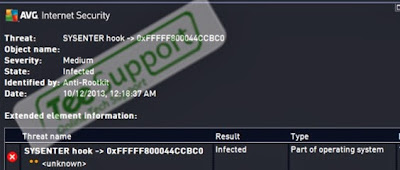
Infected with Sysenter Hook – Guide to Remove Sysenter Hook Computer Infection

Your AVG warns you that your computer got a Sysenter Hook but it fails to remove this infection? You really should know this virus first before you try to remove it. Learn a guide to remove Sysenter Hook from this passage.

Sysenter Hook Description


Users got warning message from AVG International Security anti-virus program that their computers are infected with Sysenter Hook. Sysenter Hook is a dangerous computer infection which belongs to the Trojan horse family. It is able to destroy system files and infects part of operation system. The “Remove selected” and “Remove all” button do not work to remove this infection. On another hand, Sysenter Hook infects system’s essential files. If you remove the files mistakenly, your system will be destroyed.

11/10/13

How to Remove Tube Dimmer – Manual Uninstall Help

Many users are confused about Tube Dimmer recently, for it causes many problems for users. This post will give you an introduction of Tube Dimmer, and provides a removal guide to users as well. 

Tube Dimmer Description


Tube Dimmer seems to be a useful program that “allows you to turn off the lights when watching videos on your favorite web sites”. However, many users come across serious problems once installed. First of all, users’ homepages or searching results will be redirected to Tube Dimmer-related web sites. In this perspective, the default browser settings such as home pages, DNS settings, default search engines and so on. That is because, Tube Dimmer installs malicious toolbar and add-ons to the browsers, so that it can take control of the browsers. In fact, Tube Dimmer is able to affect popular browsers including Internet Explorer, Google Chrome and Mozilla Firefox. Besides, Tube Dimmer drops malicious files and registry entries to the infected system.

11/8/13

Gorilla Price Removal Guide

Do you get advertisements from Gorilla Price? Have you tried to remove Gorilla Price? Maybe you can learn something about Gorilla Price, and then you can remove it smoothly. 


Gorilla Price Description


Gorilla Price is an adware program that annoys users’ online activities heavily. It drives users crazy because you just cannot get rid of Gorilla Price at any place any time. Whenever users open their browsers, Gorilla Price appears and displays various kinds of advertisements related to commercial products, online shopping, or computer optimizer programs. Gorilla Price also causes browser problems such as homepage hijacker or search results redirections. In fact, Gorilla Price injects malicious files and registry entries to the infected system, and installs malicious toolbar and add-ons to popular browsers such as Internet Explorer, Google Chrome or Mozilla Firefox. In this way, it is able to settle down in browsers and causes browser problems and displays commercial advertisements.

Learn to Remove get-new-java.com Step by Step (Virus Removal)

Get the get-new-java.com pop-ups? Do you need to update your java, or do you need to remove the get-new-java.com warning message? Read this passage, then you can make a decision. 

Introduction of get-new-java.com Pop-up


Many users are complaining the get-new-java.com (also http://get-new-java.com/, or http://get-new-java.com/index.php?dv1=Ybrant%20Digital) pop-up recently. Whenever they open their browsers, they get pop-up stating that “It is recommended that you update java to the latest version to view this page”, despite which web page they intend to open. In another word, the get-new-java.com pops up takes control of the homepages, and users cannot use their browser as usual. In reality, all browsers including Internet Explorer, Google Chrome and Mozilla Firefox can be affected with this nasty get-new-java.com pop-up.